공지
MapleStory Classic World FAQ
번역하고 있어요. 끝나면 이 화면이 저절로 바뀌어요.
When does Founder's Access begin and when is Grand Launch? +
With Founder's Access, you can start playing in MapleStory Classic World on Tuesday, October 6, 2026 at 11:00 AM PDT (2:00 PM EDT / 8:00 PM CEST / 4:00 AM AEST October 7) via the Nexon Launcher or Steam, no beta key required!
If you purchased a Zakum Package through Steam, you can play via both the Nexon Launcher or Steam. Details regarding the server launch time will be provided at a later date.
Grand Launch will begin on Wednesday, October 21, 2026 at 11:00 AM PDT (2:00 PM EDT / 8:00 PM CEST / 4:00 AM AEST October 22), available on the Nexon Launcher and Steam.
Can I pre-download MapleStory Classic World for Founder's Access? +
Yes, it is recommended to pre-download MapleStory Classic World before Founder's Access begins, to ensure you can jump into the game the moment servers go live.
For Nexon Launcher, since the MapleStory Classic World game client cannot be downloaded until launch day, you can save time by getting your Nexon Launcher ready right now.
- Download and install the official Nexon Launcher from the Nexon website.
- Log in with your Nexon account.
- On Launch Day: Locate MapleStory in your library, select the MapleStory Classic World toggle, and download the standalone client.
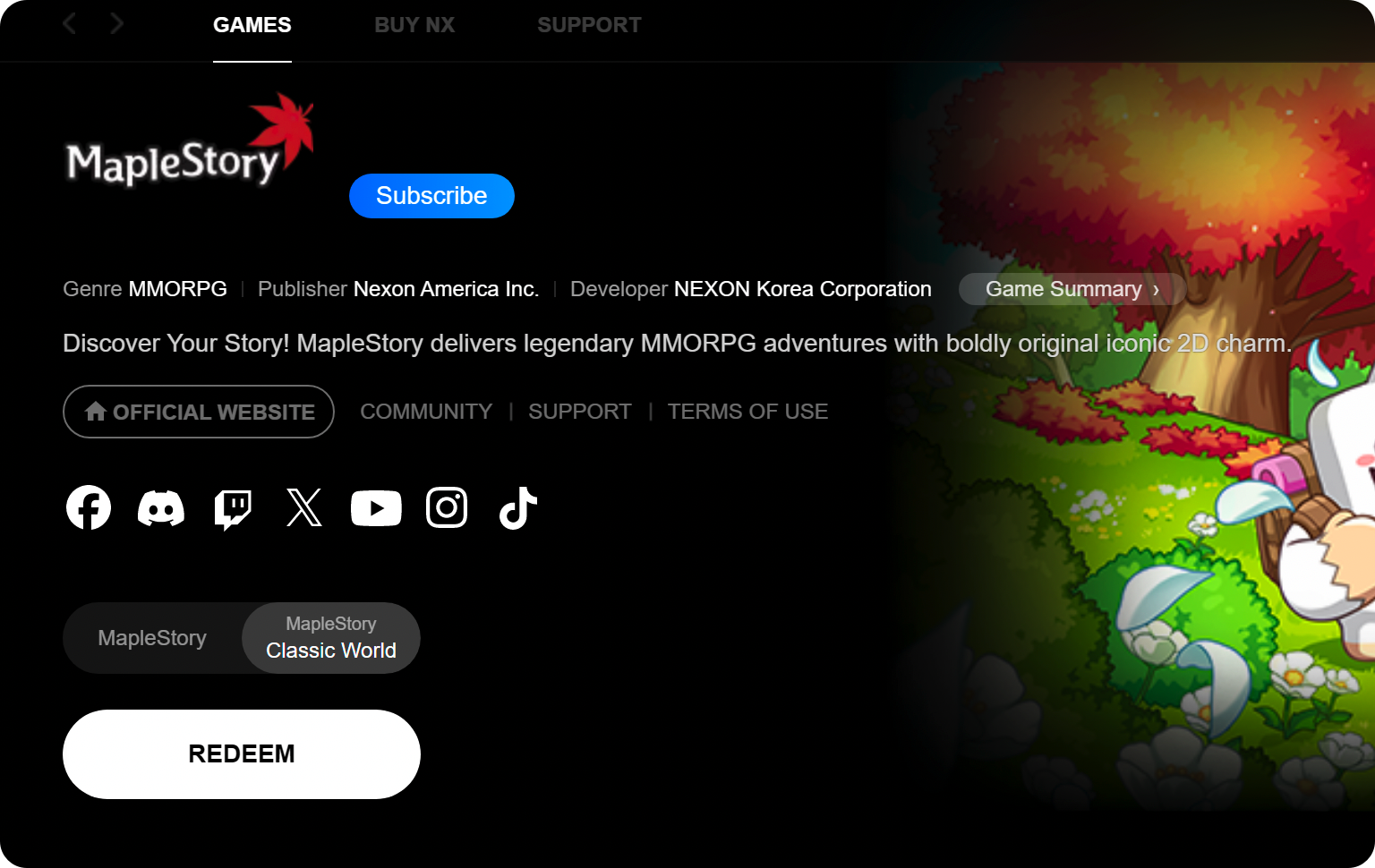
Note: The MapleStory Classic World option won't be available until Founder's Access launch day.
For Steam, because MapleStory and MapleStory Classic World are bundled together, you will need to have both MapleStory and MapleStory Classic World installed. You will be able to pre-download by having MapleStory fully installed and updated prior to the launch, and it is highly recommended to also link your Nexon account to your Steam profile prior to the launch.
- Open your Steam Library and locate MapleStory.
- Click Install and select your preferred drive.
- Allow the base download to finish completely and let Steam apply any pending updates.
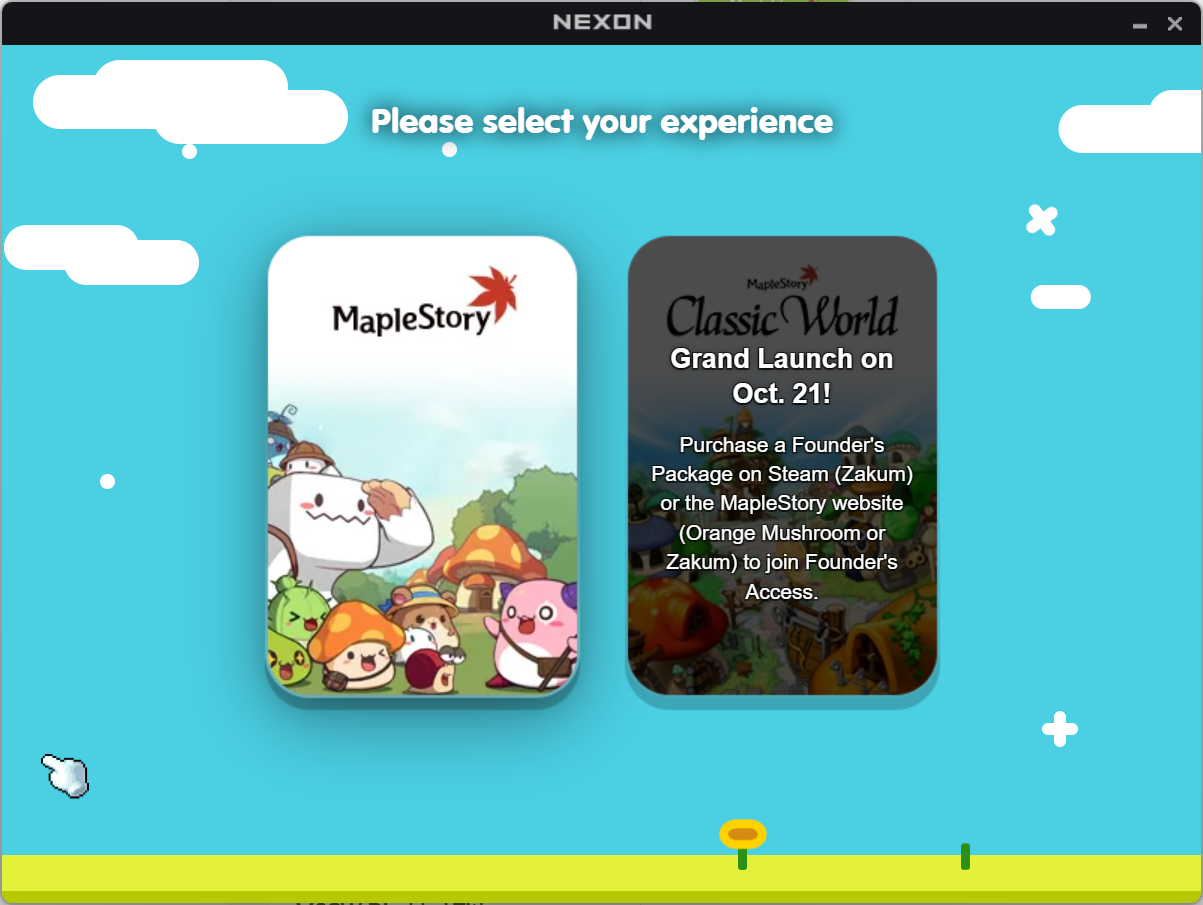
Note: The MapleStory Classic World option won't be available until Founder's Access launch day.
How do I link my Nexon account to my Steam profile? +
Via Web (Recommended): Log into your Nexon account on the official website, navigate to your Account Settings, and link your Steam profile directly from your browser without waiting for the game to download.
Via Steam: Launch MapleStory through Steam once your download finishes. When prompted, sign in with your Nexon credentials to confirm the link between your accounts.
Is MapleStory Classic World playable on macOS, and how do I install it? +
Are IGNs (In-Game Names) shared between MapleStory and MapleStory Classic World? +
What is included in each Founder's Package tier (Snail, Orange Mushroom, Zakum)? +
- Snail Package includes the following exclusive items:
- Mark of the Founder (Tan)
- Glimmer of the Founder
- Jr. Balrog Invasion x50 (Expires 90 Days) (Consumable Transformation Item)
- Well-Loved Outfit Set
- Orange Mushroom Package includes:
- All items included in the Snail Package
- Founder's Access on October 6, 2026
- Mark of the Founder (Brown)
- Glow of the Founder
- Founder's Thief Outfit Set
- Zakum Package includes:
- All items included in the Snail and Orange Mushroom Packages
- Founder's Access on October 6, 2026
- Mark of the Founder (Black)
- Radiance of the Founder
- Manji's Outfit Set
- Founder's Chat and Label Rings
Can I upgrade my Founder's Package tier after buying, and how does it work? +
If you purchased either the Snail or Orange Mushroom Package through the Nexon website, you can upgrade to a higher tier (Orange Mushroom or Zakum) at any time during the sales period by paying the price difference. When you upgrade, only the additional items from the new tier are delivered to your mailbox, and any items you have already claimed will not be duplicated.
When logged in to the Founder's Package page, you can see what package you have currently purchased, as well as the option to "UPGRADE" to another package. Click the "UPGRADE" button to pay the price difference and convert to the higher-tiered package.
If you upgrade from the Orange Mushroom Package to the Zakum Package after Founder's Access has started, the additional Zakum Package items will be delivered to your mailbox after your purchase is confirmed and upon your next login.
Upgrades are available until October 14, 2026 11:59 PM PDT, when sale of Founder's Packages ends. Packages cannot be downgraded once purchased, so pick the tier that's right for you. Upgrades are not available on Steam.
Do the Founder's Package items expire? +
Yes, you must pick up the items from your in-game mailbox on MapleStory Classic World before November 30, 2026 at 11:59 PM UTC. If not claimed from your mailbox, the items will expire. Once you claim your package from your mailbox, you will have 30 days to open it.
Click HERE for details of tradability and duration of each item.
Note: Outfit sets come packaged in a box that have a 30-day duration and are tradable within your account. Upon opening the box, the resulting outfit items are permanent and untradable but can be transferred to other characters on the same account and within the same world via the Cash Inventory.
Why does the Steam version only offer the Zakum Package? +
Due to Steam's policies, package upgrades are not supported the way they are on our own store. To prevent unintended duplicate purchases, we have chosen to offer only the Zakum Package, our most complete Founder's Package tier on Steam.
Please check the Founder's Package Purchase Guide for more information!
If I'm banned in MapleStory, am I also banned in MapleStory Classic World? +
Yes, MapleStory and MapleStory Classic World operate as one game service under a single account.
Account sanctions will be enforced across both worlds. A penalty issued in one world extends to the other, and players cannot avoid punishment by simply switching games.
Can I have both MapleStory and MapleStory Classic World applications open at the same time? +
Which languages are supported, and how do I change the game language? +
How do I connect a controller to play MapleStory Classic World?+
What controllers can be used to play MapleStory Classic World? +
Do Maple Points carry over to MapleStory Classic World? +
What are Leaf Points? +
Is NX shared with MapleStory Classic World and MapleStory? +
Do my MVP benefits in MapleStory apply to MapleStory Classic World? +
Can I gift items in the Cash Shop to friends? +
Can I buy a Founder's Package with NX? +
What is shared between MapleStory and MapleStory Classic World? +
Can I transfer Signature Style Collection items to my other characters in MapleStory Classic World? +
Yes, Signature Style Collection boxes can be transferred between characters on the same account through the Cash Inventory within MapleStory Classic World.
Any selector coupons contained within the Outfit Set Coupon received from the box are untradable. Once a selector coupon is used, the resulting items can be transferred between characters on the same account in MapleStory Classic World through the Cash Inventory. Please note that hair and face styles obtained from hair and face coupons are untradable.